A simple request: Add file uploads
A feature can take three lines of code and still take two weeks.
Storing a photo someone uploads sounds simple. Behind it sit half a dozen separate cloud services that have to be created, connected, and locked down correctly – none of which the developer can properly test on their own laptop until it’s already running in the cloud.
AWS just changed that with Blocks – a toolkit that lets developers build production-grade full-stack applications on AWS without needing to master AWS itself.
Why AWS Knowledge Became a Bottleneck
Before we look at the solution, let’s understand exactly where things broke down –
- Explosion of Services – AWS now has 200+ services. A typical production app requires deep expertise across 5–10 of them, each with its own quirks, IAM permissions, and SDK patterns.
- The Expertise – Learning one service takes weeks. Learning how services interact, for example – RDS + Secrets Manager + VPC subnets – takes months. That knowledge lives in a handful of engineers, and everyone else waits.
- The DevOps Bottleneck – Developers can’t ship without infrastructure engineers. A simple feature request (“add file uploads”) turns into a cross-team ticket, a Terraform PR review, and a two-week delay.
- Environment Parity – Local development rarely mirrors production. Teams spend weeks debugging issues that only appear in the cloud, chasing environment differences rather than actual bugs.
- Developer Experience – Even seasoned engineers feel the drag – mentally switching between application logic and infrastructure concerns slows feature work down significantly.
AWS Blocks solves all of this in one move.
What Is AWS Blocks?
AWS Blocks is a backend toolkit for building full-stack applications on AWS. It’s a collection of pre-built, composable components – called “Blocks” – that give developers production-ready AWS capabilities without requiring them to master the underlying services.
Each Block handles exactly one feature area:
- Database Block – production-ready relational storage
- AuthCognito Block – user authentication and session management
- FileBucket Block – file storage and retrieval
- AsyncJob Block – background job processing
Pick the Blocks you need, compose them together, and AWS automatically creates the production infrastructure behind them. No Terraform. No CloudFormation, No infrastructure PR.
See It in Action: Storing Data
Let’s make this concrete. Here’s what saving a record to the database looks like with each approach.
Traditional AWS — DynamoDB SDK (~50 lines)
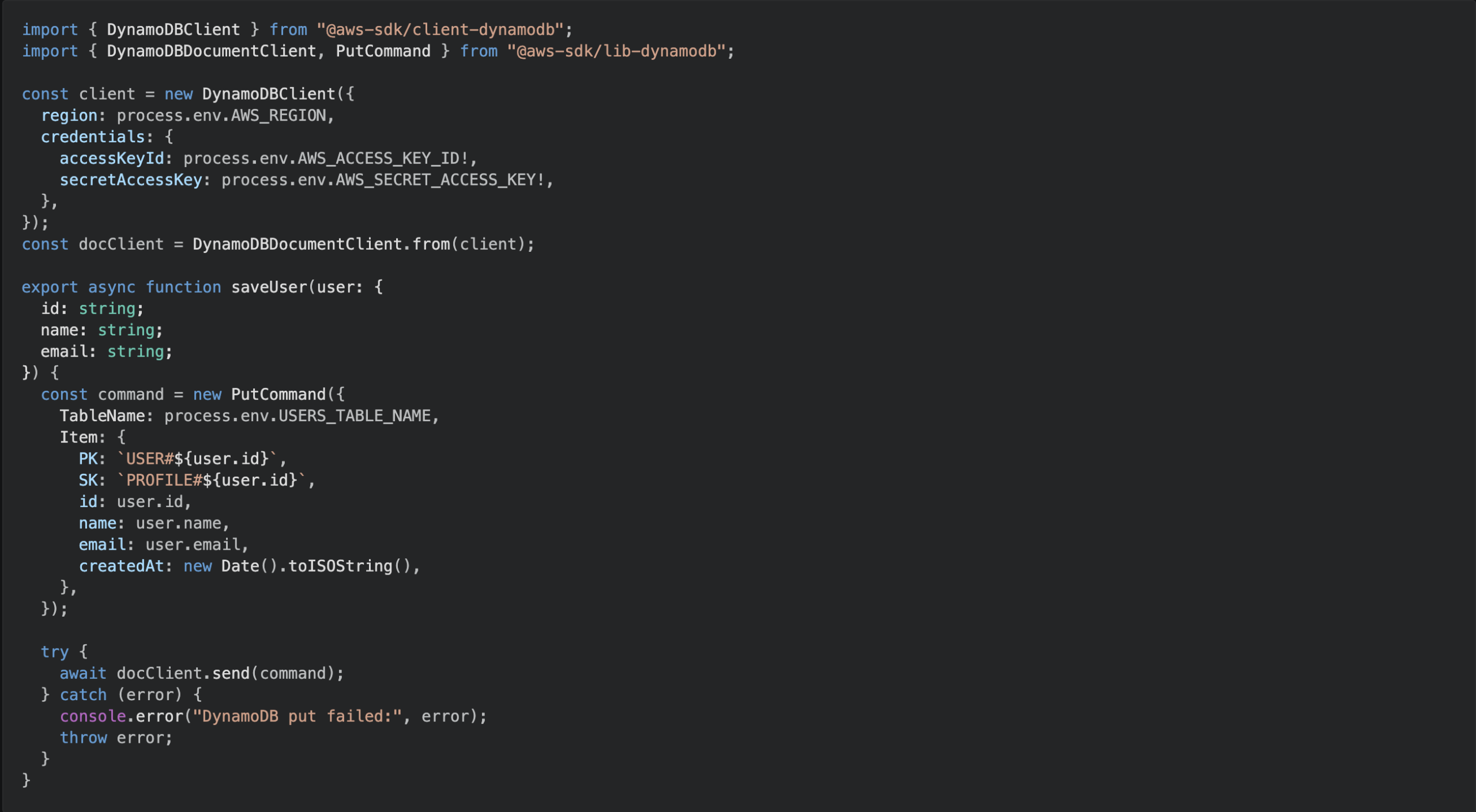
And that’s just the application code. You still need the Terraform (or CDK) to provision the table, the IAM policy to allow Lambda to write to it, and a LocalStack or Docker setup to test it locally.
AWS Blocks — Database Block (2 lines)

Same result. The table is provisioned automatically at deploy time, typed based on your schema, and backed by in-memory storage locally – no setup required.
How AWS Blocks Works: Same Code, Three Environments
AWS Blocks uses a technique called conditional exports to run the same application code in three completely different contexts – without any code changes between them.
- Local Development (Your Laptop) – Blocks use in-memory storage. No AWS account required. No Docker, no LocalStack setup. You get a working local environment in under 30 seconds.
- CDK Synthesis (Deploy Time) – When you run a deployment, Blocks translate directly into CloudFormation templates. The AWS infrastructure is defined and provisioned automatically.
- Production (AWS Lambda Runtime) – Blocks call real AWS services through their SDKs. Everything runs production-ready with zero changes to your application code.
Same code. Three environments. No translation layer. No environment-specific branches.
Why AWS Blocks Changes Everything
- Old approach: Master AWS → Design infrastructure → Write app logic
- AWS Blocks approach: Write app logic → Infrastructure comes along
Infrastructure becomes a side effect of your application code, not a separate design concern. You no longer need to be an AWS expert to deploy production-grade applications. You just need to know JavaScript or TypeScript and how to build apps.
Get Started with AWS Blocks
AWS Blocks doesn’t ask developers to stop learning AWS – it removes AWS expertise as a prerequisite for shipping. The infrastructure knowledge is baked into the Blocks themselves, maintained by AWS, and composed automatically as your application grows.
For teams bottlenecked on DevOps, or developers who want to ship without a six-month AWS ramp-up, Blocks may be the most practical shift in the AWS developer experience in years.
Then vs Now
| Aspect | Traditional AWS | AWS Blocks | Impact |
|---|---|---|---|
| AWS Knowledge Required | Deep expertise | None | No learning curve |
| Infrastructure Code | 500+ lines | Auto-generated | Zero boilerplate |
| Local Dev Setup | 1–2 hours (Docker, LocalStack) | 30 seconds | 100× faster |
| Environment-Specific Code | 30–50% duplication | 0% duplication | Single codebase |
| Code to Store Data | 50+ lines SDK calls | 2 lines | 95% less code |
| DevOps Bottleneck | High | Eliminated | Developers unblocked |
| Type Safety | Manual sync (error-prone) | Auto-synced | Zero type mismatches |
Ready to try it?
AWS Blocks Documentation — official docs and quickstart guide
AWS Blocks GitHub — source, examples, and community discussions
AWS Blog Announcement — the official launch post with deeper technical detail