
The landscape of software development is undergoing a revolution, driven by the emergence of powerful AI coding assistants. These tools promise not just faster coding, but a fundamental shift in how developers interact with their projects. At the forefront of this transformation are two prominent players: Cursor and GitHub Copilot X (the expanded vision of the original Copilot).
While both aim to augment the developer’s capability using large language models, they approach the problem from fundamentally different directions: an AI-first environment versus an AI-powered integration.
Below details will dissect the core philosophies, feature sets, and ideal use cases for each, helping us navigate the choice between these two powerful “pair programmers.”
1. The Core Philosophy: AI-Native IDE vs. AI-Powered Assistant
The most significant distinction between the two lies in their foundational design principles.
GitHub Copilot X: The Seamless Sidekick
GitHub Copilot X is an integration, designed as a sophisticated “sidekick” that fits seamlessly into a developer’s existing environment and muscle memory. It works within established IDEs like VS Code, JetBrains, and Visual Studio, requiring minimal change to a user’s workflow.
Focus:
Real-time, in-line code completion and unobtrusive suggestions that maintain developer “flow state.”
Approach:
Augmenting traditional development practices rather than reinventing them.
Best For:
Developers who value speed, familiarity, and a lightweight addition to their existing, optimized setup.
Cursor: The AI-First Environment
Cursor is an AI-native IDE, built on a fork of the popular VS Code framework but re-engineered from the ground up around conversational AI. In Cursor, the AI chat interface isn’t a secondary panel; it’s the primary way you interact with your code.
Focus:
Deep codebase context, conversational refactoring, and AI-driven navigation and debugging.
Approach:
Redefining the entire development environment to prioritize AI interactions over traditional command inputs.
Best For:
Developers tackling complex legacy codebases, performing heavy refactoring, or building new projects where they want to leverage conversational AI for guidance and execution.
2. Feature Face-Off: Beyond Simple Autocomplete
Both tools offer basic autocomplete, but their advanced features highlight their distinct philosophies.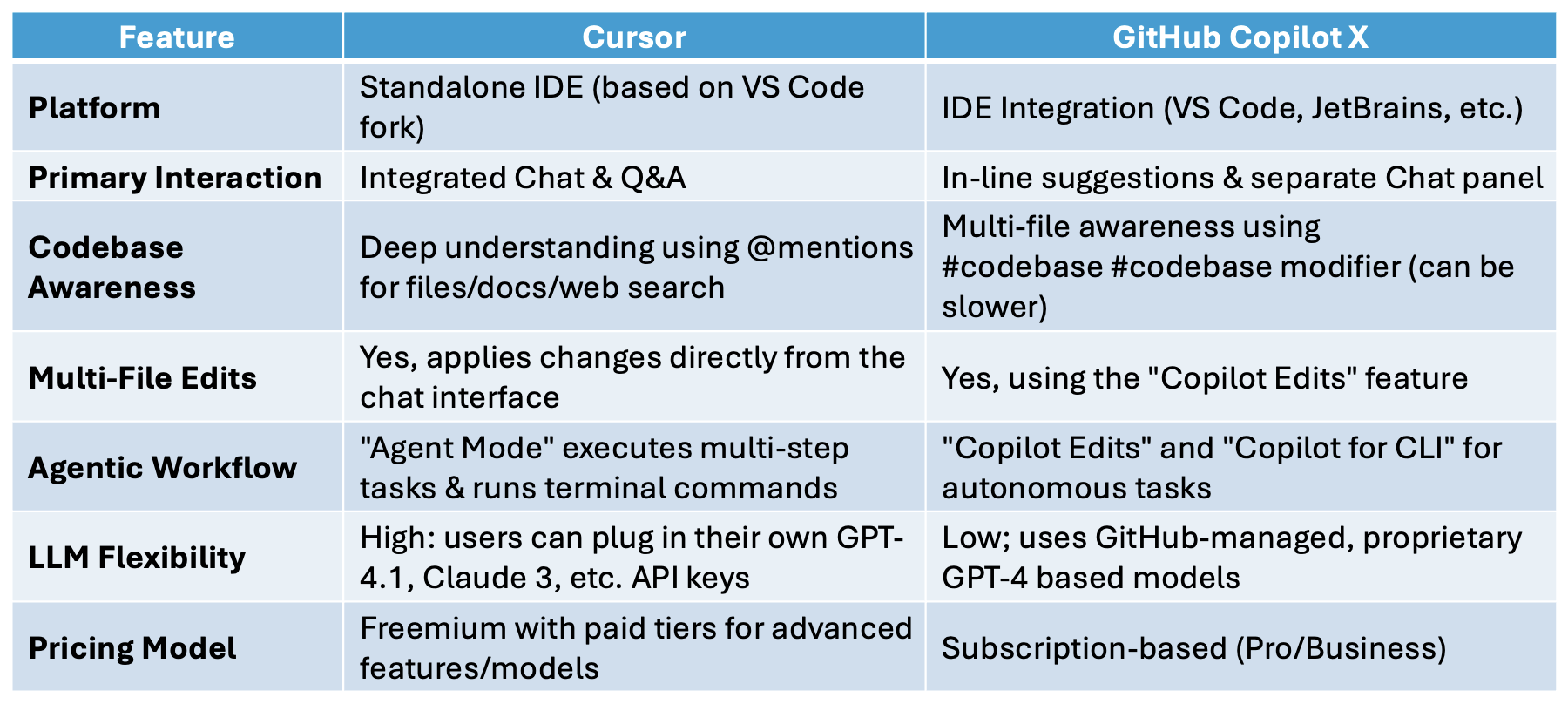
3. The Developer Experience: Flow vs. Context
The practical experience of using these tools is markedly different.
The Copilot Flow State
Copilot users often describe the experience as “psychic.” The AI suggests exactly the right line of code before developer even finish typing the comment. This continuous, low-friction assistance allows developers to remain deeply focused on the problem they are solving, without breaking concentration to open a chat panel or write a detailed prompt.
It is highly effective for boilerplate code, writing standard unit tests, and quickly implementing well-known algorithms.
The Cursor Contextual Deep Dive
Cursor is for when developer need help with more than just the next line. Its ability to use @mentions to pull in context from specific files, documentation links, or even a web search allows developers to ask highly complex questions like: “Using the context from @fileA.ts and @fileB.ts, please refactor this function to handle this specific edge case and apply the changes.”
This conversational approach makes tackling complex refactoring projects faster, as the AI acts more like a thoughtful colleague you can bounce ideas off of, rather than a silent autocomplete engine.
4. The Verdict: Which Tool is Right for You?
The “winner” in this battle is entirely dependent on a developer’s specific needs, working style, and project requirements.
Choose GitHub Copilot X if:
- You value speed and seamless integration. You want an AI that fits into your existing VS Code or JetBrains setup without changing your habits.
- You mostly work on standard coding tasks where robust, fast autocomplete provides the most value.
- You prioritize GitHub’s security and enterprise governance solutions that come bundled with their business plans.
Choose Cursor if:
- You are tackling complex legacy code or heavy refactoring. You need the AI to understand deep project context to be truly useful.
- You prefer a conversational, chat-first workflow over in-line suggestions.
- You want flexibility and control over the underlying LLM models used (e.g., choosing Claude 3 Opus over GPT-4).
- You want more advanced agentic capabilities that can autonomously run terminal commands and iterate on tasks.
The future of coding is intelligent, and both Cursor and Copilot X are paving exciting paths forward. Whether you opt for the seamless assistance of Copilot or the AI-native environment of Cursor, adopting one of these tools is a sure way to supercharge your productivity in the age of AI.