When I first started using XR Blocks, I had a couple of simple questions: How far can this tool actually take an idea? Could it be used for quick ideation without immediately dropping into a more traditional XR workflow?
After spending time with it, two things become clear from the outset:
- XR Blocks is a real step forward for XR ideation, but it is still best understood as an early-stage grey-boxing tool rather than a full XR demo builder.
- For quick, simple ideation, it can be useful. For anything expecting polish, reliability, or depth, expectations can drift away from reality pretty quickly.
That does not make it uninteresting. It just means it needs to be framed correctly.
(For future reference, every project referenced or prompt given to Gemini was sent with setting Gemini’s model usage to “Pro” described as “Advanced math and code with 3.1 Pro”)
Fast Starts, Rough Results
One of the most promising things about XR Blocks is how quickly it can begin turning an idea into something spatial. In one test, after a detailed prompt failed entirely after about 10 minutes with no meaningful status updates, a more compact version began reasoning within seconds, started describing the need less than a minute later, and moved into code generation shortly after that. Within about a minute and a half, the code was executing in the simulator.
That timing does matter. Getting from a blank page to something is often the hardest part of early ideation, and XR Blocks can help close that gap.
The tradeoff is that the resulting environment is generally grey-boxed. Shapes are primitive, layouts are rough, and the emphasis is on general composition rather than polished presentation. In that sense, XR Blocks behaves much more like a blockout or grey-boxing tool than a finished-world generator.
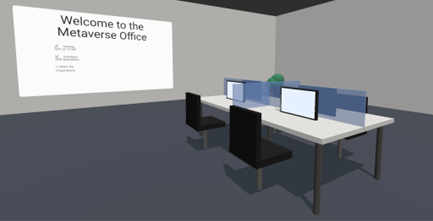
This isn’t necessarily a weakness—blockouts are a common and valuable part of traditional game and XR development, and that’s where much of XR Blocks’ immediate value lies. However, when presenting grey-boxed environments in ideation sessions, it’s important to reinforce that they don’t represent the final product.
XR Blocks can also support imported 3D models, but results depend on assets being formatted as expected. While documentation mentions support for GLTF, GLB, and THREE.Object3D, in practice there are workflow constraints—files need to be directly accessible via public links, without redirects or viewer layers.
The main workaround is to break the Gemini-to-generated-page loop, download the generated code locally, and then manually update asset references in the HTML to point to local files before serving the experience through a simple local web server. That does work, but it is also a good example of where “supported” and “frictionless” are not always the same thing.
While you may see other demonstrations of XR Blocks showing full 3D models loading, remember the usable formatting and access requirements of those models either require direct internet hosting of the file, or hosting on a local web server for showing the WebXR view and providing the 3D files by import from the local machine. This isn’t to say that impressive looking results aren’t possible for XR Blocks, they very much are. There’s a bit more work involved, however, in getting it looking as professionally polished as that than just a few prompts in a Gemini chat box.
Useful for Ideation…
In practice, XR Blocks feels best suited for quick ideation. It can help creative teams visualize a space, test a rough layout, and explore whether an idea feels directionally right.
Where expectations can drift away from reality is in assuming that this same workflow will also produce a feature-complete, stable, polished XR demo in one session. That was not my experience.
For example, XR Blocks was tested for building an open-concept VR office and enabling controller-based movement in a Chromium browser on Quest 3. The environment came together quickly in a grey-boxed form, but interaction proved more challenging.
Even after providing details like device type and joystick behavior, movement didn’t work initially. Progress only became visible after adding a debug overlay to track controller inputs, which helped enable movement in a later prompt. However, removing the debug view caused the movement to break again, requiring further iteration.
This highlighted that while iteration can be effective, it can also be fragile. At times the process feels intuitive, but without clear, visible feedback between prompts, it can become harder to guide and maintain momentum.
…Limited for Full Prototyping
Keeping in mind that XR Blocks is designed for prototyping, the current output reflects that intent. The request was for a VR-simulated nuclear reactor control panel, and what’s been launched—without changing the camera position or angle—provides an initial setup of floating UI panels with some animations and screens. At this stage, it’s primarily a visual foundation, with interactive elements like buttons, switches, or a SCRAM control yet to be added, offering a clear next step for enhancement.
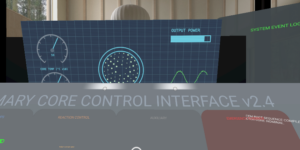
Gemini was then asked to make the controls more physical rather than relying on floating visuals. The result included a minimal set of buttons, a couple of stylized screens, and a SCRAM button, but it still didn’t fully meet expectations.
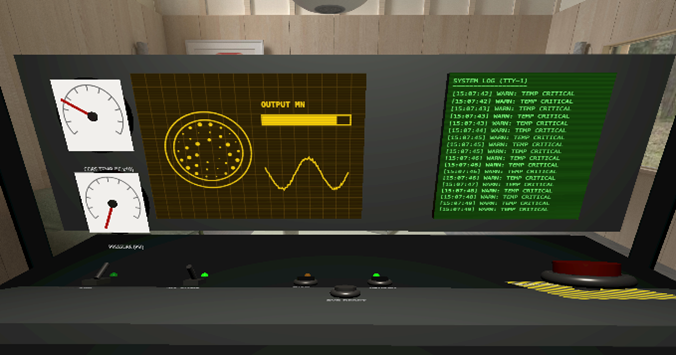
Another redesign focused on a more specific, nuclear control-room-inspired interface, with the prompt clearly referencing a target panel and including an image for guidance. The final result is shown below.
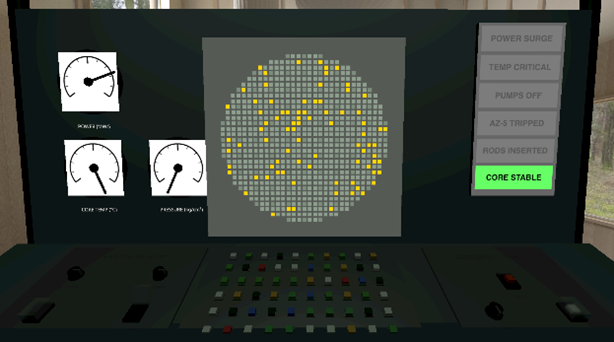
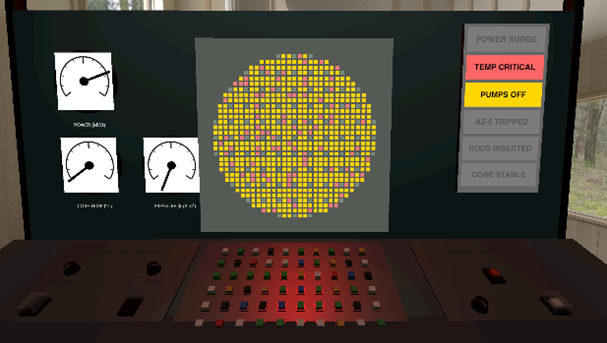
A few knobs were interactive, though responses were inconsistent, triggering only every few interactions depending on the control. Labels were sparse, and functionality was limited to basic actions like toggling pumps and adjusting control rods. While the goal wasn’t full simulation accuracy, it was to match the intended style, which eventually came through with some effort.
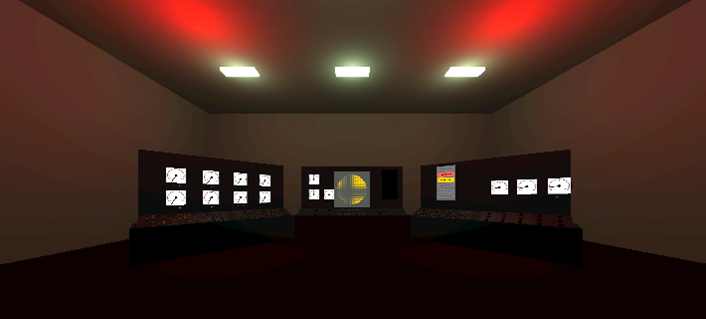
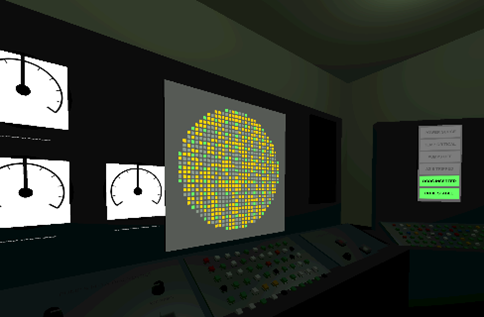
In the final step, Gemini was asked to expand the panel into a control room. It added walls, overhead lighting, alert-trigger logic for critical states, and extra panels with buttons and meters to better convey a complete room environment.
Another test involved starting a new session drawing inspiration from the recent Artemis II mission. A request was made for an Apollo Command Module control panel for an Immersive VR experience. Again, the focus was not on simulation accuracy, but on testing where XR Blocks can go in its current form. You can see below the command Module view that was produced after about 30 minutes of back and forth prompting and waiting for results.
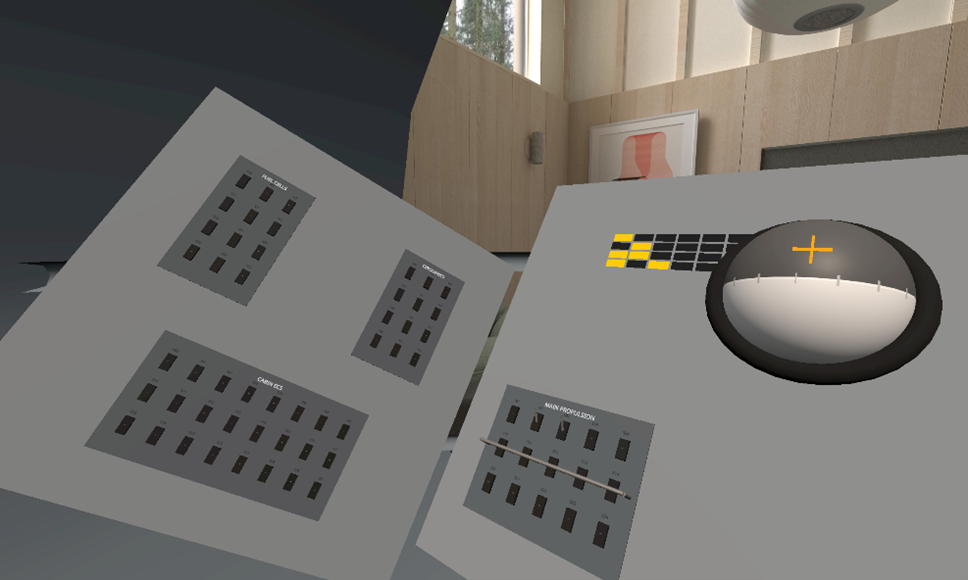
Fairly sparse in switches and knobs, no indication of what the indicator lights and ball are meant to represent, and a lot of empty space on the panels. A quick look at any Apollo command module imagery online from the missions shows that the Apollo command module was very different. And that was even after reference images were provided at the beginning of this request. Apollo diagrams and even flight computer source code are very quickly locatable for reference and could be used to base the XR Blocks VR experience on.
The first command module output from Gemini was quite basic, serving more as an initial starting point than a fully developed panel. No buttons, no knobs, no switches, no capsule info screens (UI panels were present however), and no shell of a capsule to simulate the look of being within a capsule that could be flying through space.
To reiterate clearly: Gemini was given a pilot’s viewpoint of the Apollo Command Module and tasked as follows:
“You are an expert flight systems engineer with XR Blocks expertise in designing spacecraft capsules for VR simulations. Using the provided images, recreate the look of the buttons, switches, knobs, indicators, etc. of the Apollo Command Module. Do not include UI based panels of text unless they are used as instrumentation screens like were seen in the Apollo Command Module”.
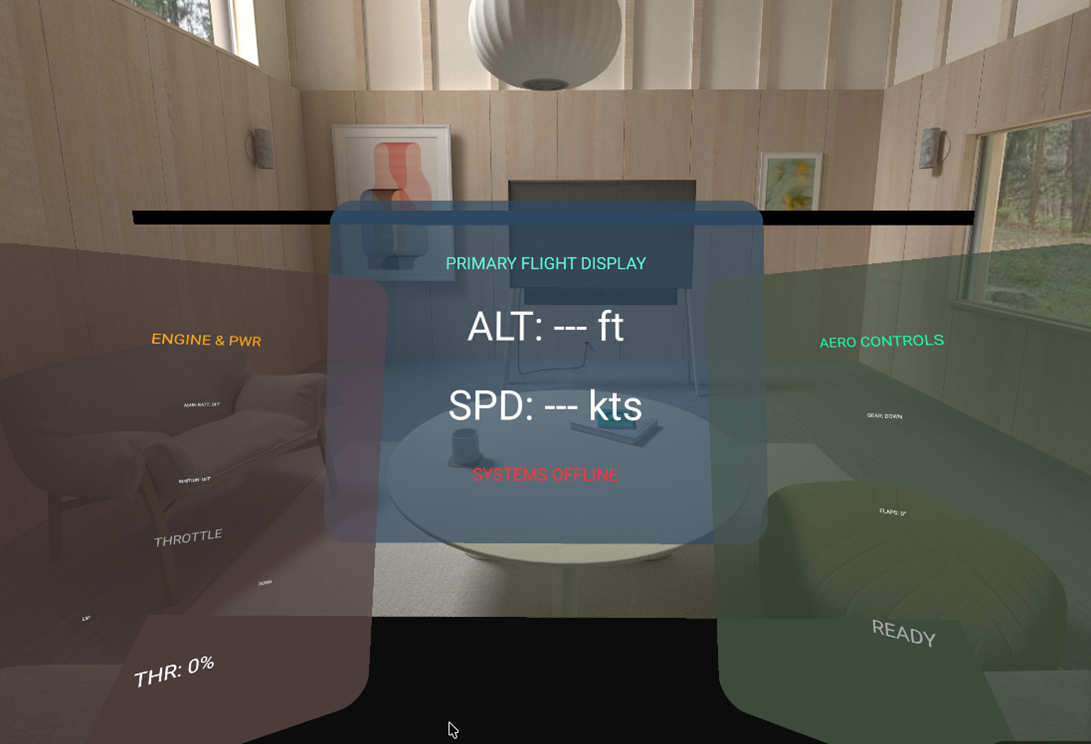
This can sometimes fall short of expectations, as even well-prepared prompts may not always produce the intended results. Keeping prompts clear, focused, and well-defined helps guide outcomes—balancing specificity without overloading detail. As familiarity with Gemini improves, prompts can become more refined using examples, though occasional gaps in interpretation may still occur.
A WebXR Tool Comes with WebXR Limits
It is also important to call out that XR Blocks is currently a WebXR tool. That matters because WebXR is not just a delivery format; it is a constraint layer.
A WebXR experience is ultimately limited by what the browser, runtime, and device expose to the application. That means capabilities can vary depending on the headset, platform, browser support, controller input handling, and what APIs are made available in that environment. In other words, the ceiling is not defined only by XR Blocks itself, but also by the WebXR ecosystem it sits on top of.
That does not mean WebXR is without value. WebXR is excellent for accessibility, quick distribution, lightweight demos, and lower-friction sharing across supported devices. But it does mean these experiences will not always match what a dedicated AR or VR application can do when built in a more conventional development stack such as Unity or Unreal Engine.
So even in cases where XR Blocks succeeds technically, it is still building inside a framework that is, by design, narrower than a fully native or engine-based XR application.
Prompt Quality Matters—A Lot
XR Blocks is heavily dependent on both sides of the interaction: the skill of the person describing the intended result in the prompt, and the way Gemini chooses to interpret that description.
That means success is not only about having a good idea. It also depends on being able to describe that idea clearly, specifically, and sometimes repeatedly. Even then, outcomes can vary. If a prompt is too long or too complex, the system may spend several minutes processing only to return a generic failure. In other cases, that same processing time may produce a result that clearly prioritized some parts of the prompt over others.
In testing, simple additions to a space often took around two minutes per iteration, while interaction-focused changes were closer to a minute to a minute and a half per iteration, depending on complexity. That is fast enough to feel promising, but still inconsistent enough that teams should be careful not to confuse “possible” with “production-ready.”
These are still multiple minutes to do one specific thing and not always completely, or well. This can absolutely speed up early ideation, but only if the team is still saving more time than it is spending trying to steer, restate, or repair the result via more prompting.
Where It Fits Today
The strongest use case for XR Blocks today is closer to a big-picture creative sandbox than a full development environment.
It gives teams, especially non-technical or mixed technical-and-creative groups, a way to start thinking spatially and see rough ideas take shape without fully committing to a traditional XR pipeline in the first few minutes. That has real value; it can help start conversations, validate general direction, and make abstract ideas feel more tangible.
At the same time, it does not replace established XR tools like Unity or Unreal Engine for scalable, reliable, or production-minded development. Those platforms still offer more control, better predictability, broader capability, and stronger support for the kinds of interactions and systems that real XR applications usually require.
If the goal is to help a room full of people visualize a very small and targeted XR concept quickly, XR Blocks has a place. If the goal is to deliver a robust, polished, cross-platform experience, the more traditional toolchain is still doing the heavy lifting.
Final Thoughts
XR Blocks offers a promising path forward—a meaningful and encouraging step in the right direction.
It is a strong starting point for creative minds who want to begin grey-boxing a VR or AR experience quickly. It offers a glimpse of what more conversational, AI-assisted XR creation might become in the future. But at its current stage, that future is still clearly in progress.
There is value in the fact that tools like this exist and continue to evolve. At v0.11.0, it still clearly signals what it is: an early glimpse of something that may eventually become much bigger.
In conclusion, XR Blocks represents an encouraging step forward in the evolution of XR creation tools. While it is still in its early stages—shaped by the current limitations of WebXR and a rapidly evolving ecosystem—it already demonstrates clear value as a platform for exploration, rapid prototyping, and spatial ideation.
Its strengths lie in helping teams get started quickly, visualize concepts, and iterate on ideas with greater speed and flexibility. At the same time, it complements—rather than replaces—established XR development practices required for building robust, scalable, and production-ready experiences.
This positioning is not a limitation, but a natural reflection of where both the tool and the broader XR landscape stand today. As generative XR tooling continues to mature, XR Blocks points toward a more intuitive, conversational, and collaborative future—one that will increasingly integrate creativity, technical depth, and user-centered design.