When we started exploring Azure’s avatar capabilities, the goal was straightforward — to understand how we could build realistic, scalable digital humans for web and XR use cases. However, very quickly one thing became clear: Azure does not provide a single “avatar API.” Instead, it offers a set of capabilities that need to be understood, tested, and combined depending on the use case. So rather than treating it as a single solution, we approached it as an exploration problem. We tried different options, built small prototypes, and evaluated where each approach fits best. This blog captures that journey — what Azure actually provides, what we implemented, and how to choose the right approach.
Understanding What Azure Really Provides
The first and most important realization during our exploration was this:
- Azure Avatar APIs generate 2D talking human videos — not 3D avatar models.
- Azure’s Text-to-Speech Avatar feature converts text into a fully rendered video of a photorealistic human speaking with a natural voice.
This means:
- You get high-quality video output with synchronized speech and facial motion
- You do not get reusable 3D assets like meshes, rigs, or blendshapes
From here, we split our exploration into two tracks:
- Video-based avatars
- 3D avatars using speech primitives
Exploring the Different Avatar Options in Azure
Option 1: Video Avatars (Text to Talking Human)
This is the core capability of Azure avatars. You provide input text, and Azure generates a talking human video with a natural voice and synchronized lip movements.
In our exploration, we evaluated this capability using Azure AI Speech with prebuilt avatars, where text input is transformed into a fully rendered video output.
The setup process is straightforward, requiring minimal configuration, while the output quality is notably high. The generated videos closely resemble studio-produced content, without requiring any manual animation effort.
This makes video avatars particularly suitable for scenarios such as training content, onboarding videos, and enterprise explainers.
Option 2: Real-Time Avatars (Interactive Streaming via WebRTC)
Next, we explored real‑time interaction.
Unlike video avatars that generate pre-rendered outputs, Azure supports live avatar streaming, where the avatar responds dynamically and streams video in real time.
Under the hood, this involves:
- Speech processing
- Real-time synthesis
- WebRTC-based streaming
In our exploration, we evaluated how speech input can be processed to generate a corresponding avatar response that is streamed live to the user.
The experience feels conversational, resembling an interaction with a digital human rather than consuming pre-generated content.
This approach is particularly suited for scenarios such as conversational assistants, live customer interfaces, and interactive applications.
Option 3: Photo Avatars
We also explored the photo avatar capability from a conceptual and documentation perspective.
In this approach, instead of using prebuilt avatars or recording datasets, a single image can be used to generate a talking head animation.
Since we did not have direct access to this feature, our understanding is based on available documentation and feature descriptions. From this, it appears that:
- The setup process is significantly simpler compared to full video avatars
- The output is primarily limited to a head‑only animation
- The level of expressiveness is relatively lower compared to trained video avatars
Even though we couldn’t validate this through implementation, it presents an interesting lightweight entry point within the Azure avatar ecosystem.
This approach is particularly suitable for quick prototypes, internal tools, and scenarios where minimal setup is required.
Option 4: Custom Video Avatars (Digital Humans)
We also explored the custom avatar capability offered by Azure from a feature and documentation standpoint.
This option allows organizations to create a personalized digital human by training an avatar using recorded video data of a real person. The resulting avatar can then be used to generate consistent, branded talking video content.
Since we did not have access to set up and train a custom avatar, our understanding is based on platform documentation and available references. Based on this, the capability appears to offer:
- A reusable digital representation of a specific individual
- Consistent visual identity across generated content
- Integration with custom or neural voices for a more realistic experience
This approach is particularly suited for enterprise scenarios requiring a strong and consistent digital presence, such as branded assistants, spokesperson avatars, and customer engagement platforms.
Option 5: 3D Avatars Using Visemes
While Azure does not provide 3D avatars directly, it offers viseme data through its speech service.
A viseme represents the visual equivalent of a phoneme, defining how the mouth and facial features move during speech.
Azure can return:
- Audio output
- Viseme IDs along with precise timing information
This data can then be used to:
- Drive blendshapes in a 3D model
- Animate 2D or 3D avatars
- Synchronize lip movements accurately with speech
This approach enables developers to build fully controllable avatar systems, where rendering and animation are handled externally.
It is particularly well suited for XR, metaverse, and real-time avatar scenarios, where low latency and spatial integration are critical.
What We Learned from Exploration
After working through all these options, an interesting pattern emerged.
Azure clearly separates:
- Visual realism (video avatars)
- Spatial and interaction flexibility (viseme‑driven avatars)
- Video avatars provide immediate quality with minimal effort.
- Viseme‑based pipelines, on the other hand, provide control and extensibility.
Decision Guide Based on Our Analysis
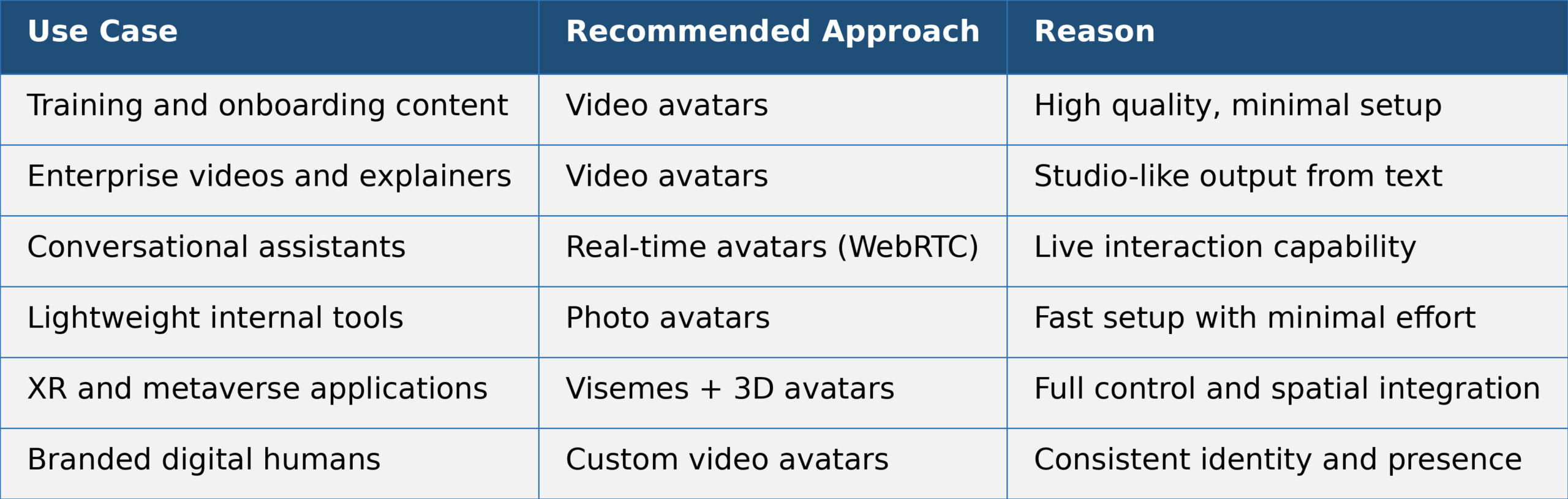
Based on our exploration and implementations, the following mapping worked best:
Latency and Cost Overview
While Azure provides multiple avatar approaches, the choice of architecture is often driven by two critical factors: latency and cost. These factors directly influence whether a solution is suitable for batch content generation, real-time interaction, or immersive 3D experiences. As shown in the table above, each avatar approach operates in a different trade-off space:
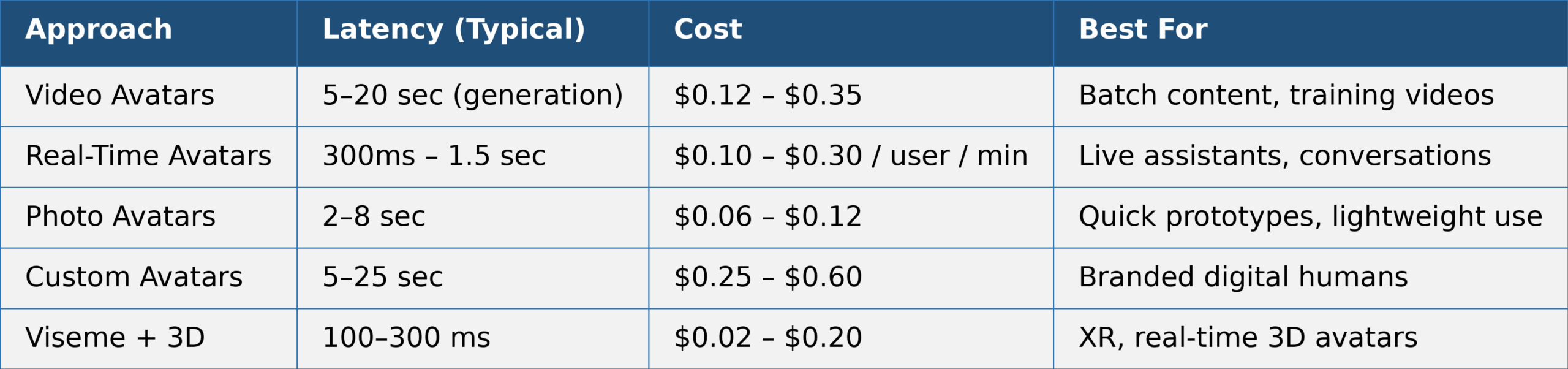
In practice, video avatars optimize for realism, real-time avatars for interaction, and viseme-based systems for performance and scalability.
Final Thoughts
Azure does not try to force a single avatar solution — and that turns out to be its strength.
Instead, it provides:
- Video‑based avatars for speed and realism
- Speech + viseme capabilities for flexibility and control
- The key decision is not which API to use, but rather:
Do you need a ready‑to‑use visual human, or do you need a controllable avatar system?
Once that is clear, the right Azure path becomes much easier to choose.