What Generative UI Is
User interfaces have traditionally been built as preplanned experiences. Designers and developers create mockups, wireframes, and flows in advance, defining what the user will see at each step. That approach has worked well for years, but as AI systems have become more capable, interfaces are starting to shift from fixed layouts toward something more responsive to user intent.
At its core, generative UI is the idea that the interface is not fully pre-coded. Rather than showing the same static layout to every user in every situation, a generative interface assembles itself dynamically — shaped by direct user input, current behavior, available data, and the task at hand. In one context it might produce a summary card, a chart, and a set of recommended actions. In another, a form, a comparison table, and a guided workflow. The interface becomes less like a static page and more like a response.
This is a meaningful step beyond traditional personalization, which might rearrange content based on known preferences or surface recommendations within a fixed layout. Generative UI goes further — it changes the structure of the experience itself. Traditional design is not disappearing, but the role of design is shifting. Rather than defining every screen in advance, designers are increasingly building systems capable of producing the right interface at the right moment.
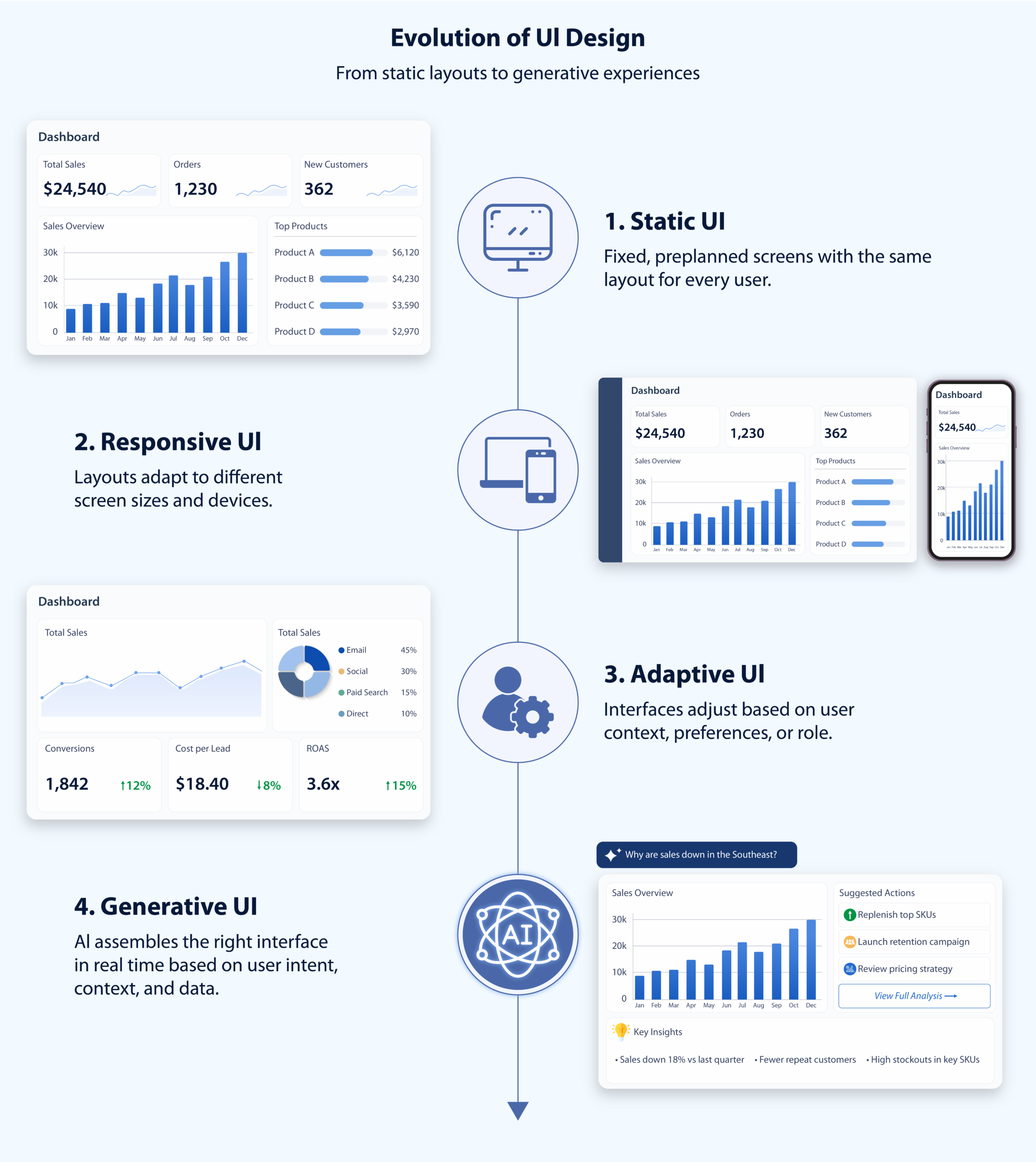
Figure 1: The evolution of UI design across four generations. Static UI (1) delivers the same fixed layout to every user regardless of context. Responsive UI (2) adapts that layout to fit different screen sizes and devices, but the content remains the same. Adaptive UI (3) goes further, adjusting what is shown based on user role, preferences, or behavior. Generative UI (4) represents the current frontier, the interface itself is assembled in real time by AI, shaped by the user’s intent, context, and live data rather than any pre-built template
Generative UI vs. Traditional UI
The major difference between traditional UI and generative UI is where the intelligence lives.
In traditional UI, intelligence lives mostly in the user. The interface presents options, and the user figures out where to go, what to click, and how to combine tools to get a result.
In generative UI, more of that burden shifts to the system. The system can interpret intent and help construct the path forward.
That does not make traditional UI obsolete. For example, imagine a project management tool. In a traditional UI, a user might need to open a dashboard, click into a project, filter tasks by due date, sort by assignee, and then review comments or blockers manually. The product provides the tools, but the user has to assemble the path.
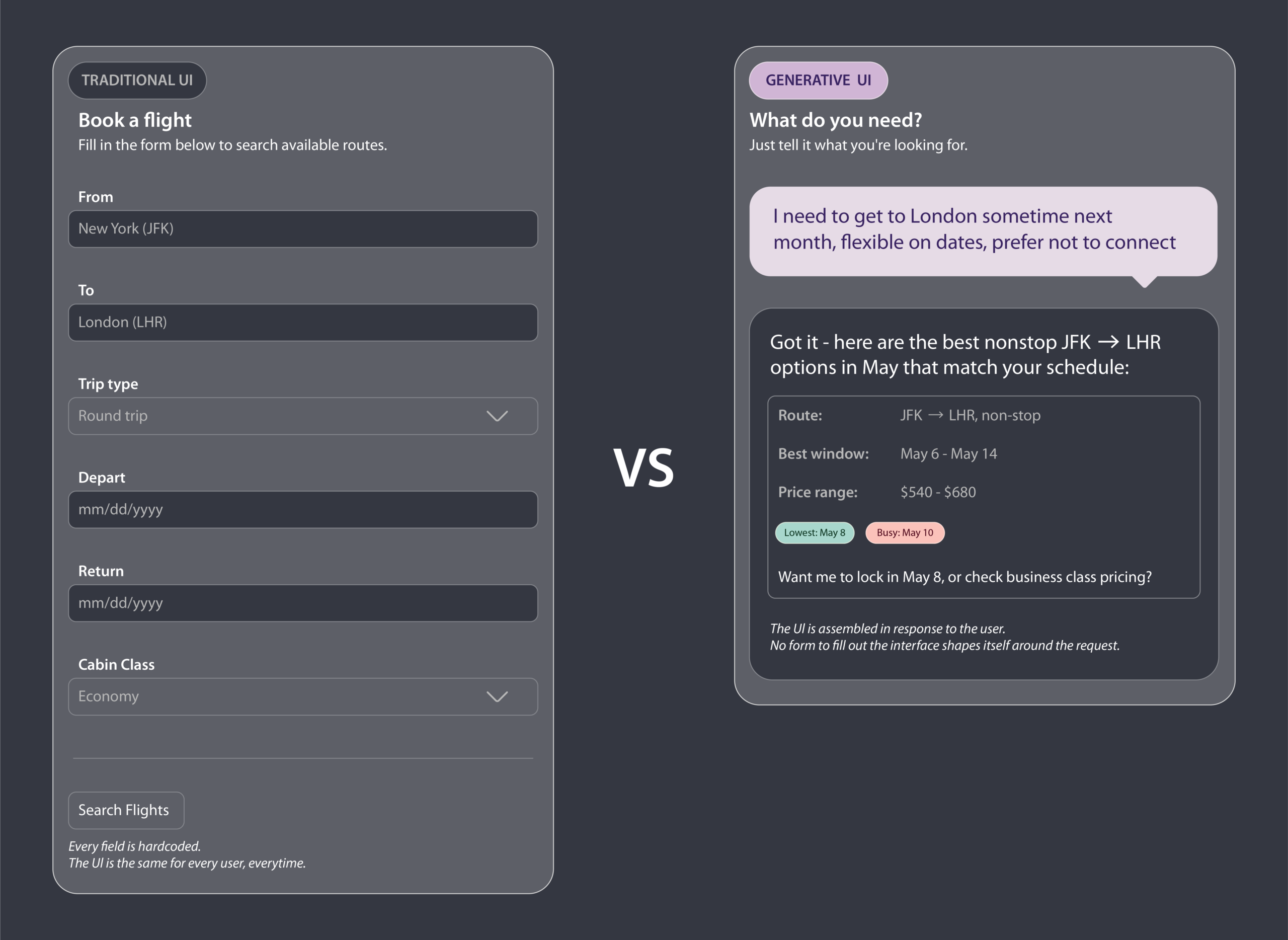
Figure 2: The same task, finding a flight, was handled two different ways. On the left, a traditional UI presents a fixed form the user must navigate on the software’s terms. On the right, a generative UI interprets a plain-language request and assembles a response around what the user actually asked for, no form required.
In a generative UI version of that same experience, the user could ask, “What is putting this week’s deadline at risk?” The system could then generate a focused workspace showing overdue tasks, blockers, recent team updates, and recommended next actions in one place. The goal stays the same, but the amount of work required to reach the answer changes significantly.
There are many cases where predictability is more important than flexibility. Banking transactions, safety-critical systems, and even repetitive workflows can still benefit from stable, explicit interfaces. In those environments, too much generation could potentially cause confusion.
How Generative UI Actually Works
To understand generative UI, it helps to think of it as a system responding to intent rather than a user navigating fixed screens. In a traditional product, the user moves through prebuilt pages, menus, and workflows to find what they need. In a generative UI system, the user’s goal becomes the starting point.
A request might begin with direct user input, such as a typed question or command, but it can also be shaped by additional context. The system may look at the user’s current task, available data, recent activity, role, or history inside the product. From there, AI helps interpret the request and determine what kind of interface would be most useful at that moment.
Instead of loading the same screen for every person, the product can assemble the right combination of interface elements for that situation. It may generate a chart, a summary card, a recommendation panel, a comparison table, or a guided workflow. In that sense, the interface becomes less like a static page and more like a response built around the user’s goal.
This does not necessarily mean every element is created from nothing. In many cases, generative UI works by selecting and arranging pre-created components from a design system in new ways. The intelligence is in how the system chooses what to show, what to hide, and how to structure the experience so the user can act more quickly.
Why Generative UI Matters
Generative UI matters because our expectations are changing due to how other technology is working. People increasingly want software to meet them where they are instead of forcing them through rigid workflows, because that is what they are starting to experience in other areas of tech. They want systems that understand goals, reduce friction, and adapt. Think about a repetitive process that usually takes you through multiple screens each time because “that’s the process”. Generative UI can help reduce the dissonance.
Consider a customer support workflow. In a traditional interface, an agent may need to open the customer profile, search past tickets, check product status, review internal documentation, and then decide what action to take. Each step may live on a separate screen. In a generative UI workflow, the agent could open the issue and immediately receive a response-focused interface that combines the customer’s history, the likely cause of the problem, relevant documentation, and suggested next steps. The tool does not just display information. It organizes the experience around solving the issue.
This matters especially in environments where tasks are complex, data-heavy, or unpredictable. In those cases, fixed interfaces often create clutter. Designers add more menus, more filters, and more settings to cover edge cases, and the product becomes harder and more tedious to use. Generative UI offers another path. It can show only what matters at this moment.
It also matters because AI systems are becoming better at reasoning across context. The user does not just navigate the product. The product actively helps shape the path.
The effect on productivity is real. When a support agent opens a ticket and the tool has already surfaced the customer’s history, the likely cause, and a suggested response — that’s not just convenience, it’s a fundamentally different workflow. The same logic applies in finance, project management, and anywhere else people spend time assembling context before they can do the actual work..
What This Looks Like in Practice
A simple way to see the difference is to compare how each model handles the same task.
In a traditional analytics platform, a manager trying to understand a revenue drop might need to choose a dashboard, adjust date ranges, apply region filters, compare categories, and decide which charts matter. The platform supplies the tools, but the user still has to build the path to the answer.
In a generative UI version of that experience, the manager could ask, “Why did revenue drop in the Southeast last quarter?” The system could then generate a focused interface showing the most relevant chart, a short explanation of contributing factors, supporting data, and suggested follow-up questions. Instead of forcing the user through a fixed sequence, the interface is assembled around the actual problem being solved.
That shift is what makes generative UI important. It changes the product from a place the user navigates into a system that actively helps shape the work.
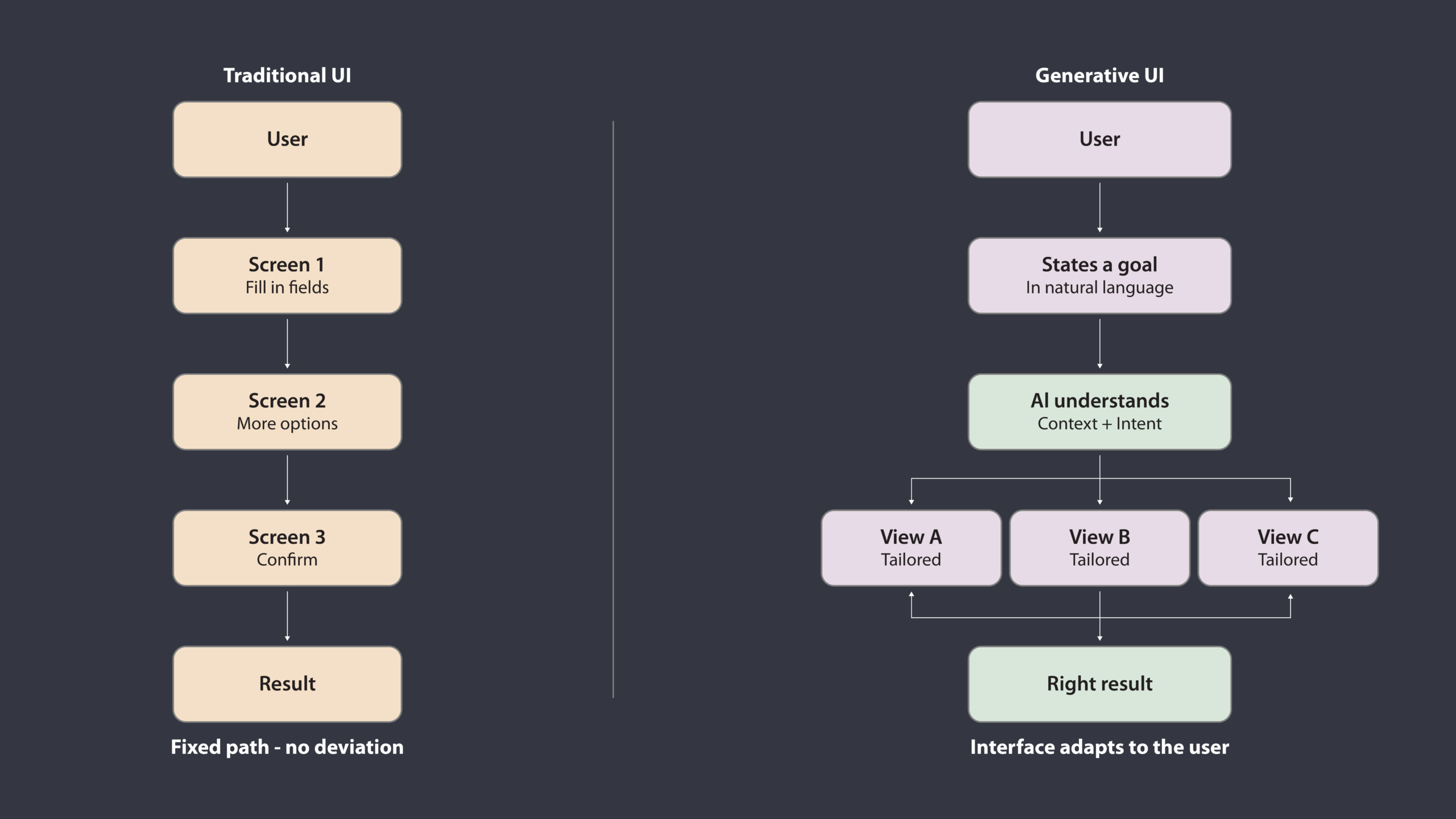
Figure 3: A traditional UI (left) routes every user through the same predetermined sequence of screens regardless of their goal. A generative UI (right) takes a single stated goal, reasons about context and intent, and adapts its output to what that specific user needs, collapsing complexity instead of spreading it across steps
Closing Thoughts
Generative UI is the next step in making software more responsive to human intent. Rather than forcing every user through the same predefined experience, it allows systems to create a user experience that fits the task, the context, and the moment.
The idea is simple, even if the execution is not, the interface should not just display the system. It should help the system respond.
Generative UI is not just about making interfaces smarter. It is about making them more useful.
Reference
- Brahmbhatt, Khyati. “Generative UI: The AI-Powered Future of User Interfaces.” Medium, 19 Mar. 2025, https://medium.com/@knbrahmbhatt_4883/generative-ui-the-ai-powered-future-of-user-interfaces-920074f32f33
- Leviathan, Yaniv, Dani Valevski, Vishnu Natchu, and Yossi Matias. “Generative UI: A rich, custom, visual interactive user experience for any prompt.” Google Research Blog, 18 Nov. 2025, https://research.google/blog/generative-ui-a-rich-custom-visual-interactive-user-experience-for-any-prompt/